Difference between revisions of "Manual:Install"
Greendreamer (talk | contribs) m (→Installing (v5.1): fixed version number) |
Greendreamer (talk | contribs) (→Install from Repository: updated install from repository for fedora, onpenSUSE oe=r SLE linux) |
||
| (8 intermediate revisions by the same user not shown) | |||
| Line 17: | Line 17: | ||
= Install from binary distribution = | = Install from binary distribution = | ||
| − | Obtain the correct file from | + | Obtain the correct file from |
| − | [http://vegastrike.sourceforge.net/files/index.html | + | [http://vegastrike.sourceforge.net/files/index.html this downloads page (old versions, up to 0.5.1.r1)] or |
| + | [https://www.vega-strike.org/install/ this downloads page (newest versions, from 0.6.0 alpha3 to the last one] | ||
== Windows == | == Windows == | ||
| Line 53: | Line 54: | ||
===Install using a package manager=== | ===Install using a package manager=== | ||
| + | Please refer to [https://www.vega-strike.org/install/ this page] | ||
| − | ==== | + | ====Linux: Red Hat/CentOS/Fedora/Rocky==== |
| − | |||
| − | |||
| − | |||
| − | |||
| − | ==== | + | The dnf packaging tool provides support for directly installing from a URL: |
| − | + | ||
| − | * | + | * dnf install https://github.com/vegastrike/Vega-Strike-Engine-Source/releases/download/v0.8.0/Vega-Strike_v0.8.0-py3-GLVND-rocky-8.5_x86_64.rpm |
| − | + | * dnf install https://github.com/vegastrike/Assets-Production/releases/download/v0.8.0/vsUTCS_v0.8.0-rocky-8.5.rpm | |
| − | + | ||
| − | + | NOTE: The Vega Strike Engine now supports two modes of using OpenGL; unfortunately this is a compile-time choice. The old OpenGL methods are supported using the LEGACY builds; while the new method uses the GLVND builds. | |
| + | |||
| + | ====Linux: Debian/Ubuntu==== | ||
| + | |||
| + | To install using Apt: | ||
| + | |||
| + | * mkdir vegastrike && cd vegastrike | ||
| + | * curl -LO https://github.com/vegastrike/Vega-Strike-Engine-Source/releases/download/v0.9.1/Vega-Strike_v0.9.1-GLVND-Ubuntu-noble_x86_64.deb | ||
| + | * curl -LO https://github.com/vegastrike/Assets-Production/releases/download/v0.9.1/vsUTCS_v0.9.1.deb | ||
| + | * sudo apt install ./Vega-Strike_v0.9.1-GLVND-Ubuntu-noble_x86_64.deb | ||
| + | * sudo apt install ./vsUTCS_v0.9.1.deb | ||
| + | Please remember to change the software version number and the Debian/Ubuntu distribution name in the instructions above. | ||
| + | |||
| + | NOTE: GUI installers like qapt-deb-installer can be used as well. Just be sure to install in the same order as listed above. | ||
| + | |||
| + | NOTE: The Vega Strike Engine now supports two modes of using OpenGL; unfortunately this is a compile-time choice. The old OpenGL methods are supported using the LEGACY builds; while the new method uses the GLVND builds. | ||
| + | |||
| + | ====Linux: Arch==== | ||
| + | |||
| + | Vega Strike has been setup as an AUR. There are many tools available for installing AURs. For example, to install with yay do the following: | ||
| + | |||
| + | * yay -S vegastrike-git | ||
== MacOSX == | == MacOSX == | ||
| − | {{FIXME}} : 0.4.3 version. Needs to be updated. | + | BE CAREFUL : Version 0.8.0 has restored building on MacOSX, but pre-built binaries are not yet being provided at this time (09/2025). |
| + | |||
| + | Please see the Vega Strike 0.5.0 for a release to use. | ||
| + | |||
| + | You can find it here : [https://sourceforge.net/projects/vegastrike/files/vegastrike/0.5.0/ VS0.5.0 binaries]. | ||
| + | Please download and install the vegastrike-0.5.0.dmg file. | ||
| + | |||
| + | {{FIXME}} : Installation for v0.5.0? | ||
| + | |||
| + | |||
| + | (Installation for 0.4.3 version. Needs to be updated. | ||
* Double-click on the dmg image and you will see Vega Strike, Vega Strike Setup and Vega Strike Setup OS X 10.2; | * Double-click on the dmg image and you will see Vega Strike, Vega Strike Setup and Vega Strike Setup OS X 10.2; | ||
* Double-click on the setup icon; | * Double-click on the setup icon; | ||
| Line 74: | Line 103: | ||
* Double-click on Vega Strike | * Double-click on Vega Strike | ||
| − | Note: on the Mac you will notice significant performance improvements by running it directly from the dmg file, but you can copy the Vega Strike application and setup into /Applications with no adverse effects aside from a slightly slower startup time. | + | Note: on the Mac you will notice significant performance improvements by running it directly from the dmg file, but you can copy the Vega Strike application and setup into /Applications with no adverse effects aside from a slightly slower startup time.) |
= Install from Repository = | = Install from Repository = | ||
==Fedora, openSUSE or SLE Linux== | ==Fedora, openSUSE or SLE Linux== | ||
| − | + | There was a repository hosted by Klauss Freire, but it is no longer available in 2025. | |
| − | |||
| − | |||
| − | |||
| − | |||
| − | |||
| − | |||
| − | |||
| − | |||
| − | |||
| − | |||
| − | |||
==Debian or Ubuntu Linux== | ==Debian or Ubuntu Linux== | ||
| − | + | Since 2013, Vega Strike is no longer in Ubuntu Repositories. | |
| − | + | There was a repository hosted by Klauss Freire, but it is no longer available in 2025. | |
| − | |||
| − | |||
| − | |||
| − | |||
| − | |||
| − | |||
| − | |||
| − | |||
| − | |||
| − | |||
| − | |||
| − | |||
| − | |||
= Install from source = | = Install from source = | ||
Latest revision as of 23:12, 13 September 2025
View this site in other languages: Deutsch – English – Français – Español – Polski – Italiano – Nederlands – Руccкий – 简体中文
 Credits Credits
|
 Manual Manual
|
Running Vega Strike 
|
A short guide on how to install Vegastrike under various operation systems.
This guide is partially updated in 2013 and 2025, with 0.5.1.r1 version for Windows (work in progress).
The old page is still available here
Contents
See also
- HowTo list
- HowTos#Installing - Installing/compiling Howtos
- FAQ:Installing - Frequently Asked Questions on installing.
Install from binary distribution
Obtain the correct file from this downloads page (old versions, up to 0.5.1.r1) or this downloads page (newest versions, from 0.6.0 alpha3 to the last one
Windows
BE CAREFUL : Version 0.8.0 has restored building on Windows, but pre-built binaries are not yet being provided at this time (09/2025). Please see the Vega Strike 0.5.1 for a release to use.
Installing (v0.5.1)
Vega Strike is packaged in a self-installable, executable program. Locate this file (either from your download or on the CD), then double click to execute.
| 1. You can see a welcome screen. Click on "Next"
|
2. Destination folder selection
|
| 3. Start menu folder selection
|
4. Icons creation on the desktop or the quick launch toolbar (or not).
|
| 5. Installation summary. Click "Install" to proceed.
|
6. Installing...
|
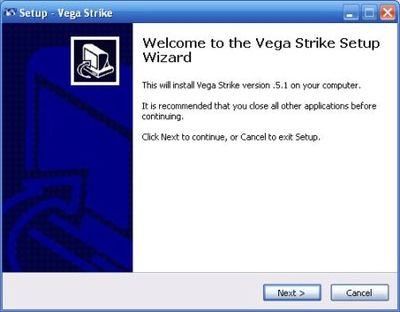
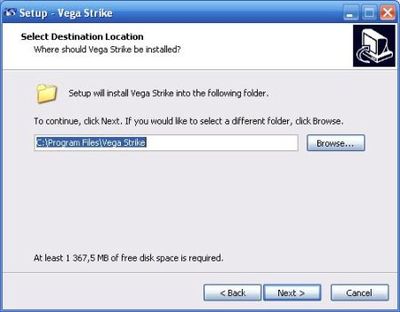
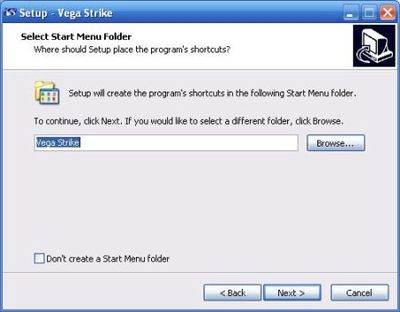

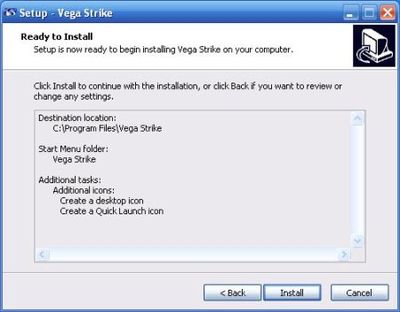
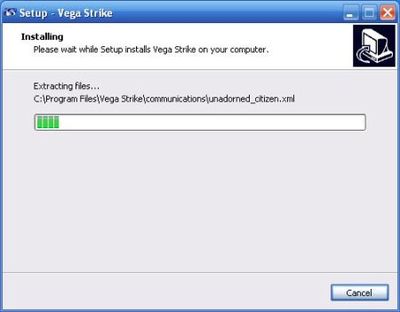
Now the program prompts you to install OpenAL, to take advantage of 3D sound, and the programming language C++ (if no yet). Then you can execute Vega Strike, by double-clicking on the desktop or quick launch icon.
Uninstalling
To uninstall Vega Strike, you can use the "Add/remove programs" window in the configuration panel, or just click on : "Start" button / "Alla programs" / "Vega Strike" / "Uninstall".
The uninstall starts immediately, and a window notifies you when it is complete.
Linux
Install using a package manager
Please refer to this page
Linux: Red Hat/CentOS/Fedora/Rocky
The dnf packaging tool provides support for directly installing from a URL:
- dnf install https://github.com/vegastrike/Vega-Strike-Engine-Source/releases/download/v0.8.0/Vega-Strike_v0.8.0-py3-GLVND-rocky-8.5_x86_64.rpm
- dnf install https://github.com/vegastrike/Assets-Production/releases/download/v0.8.0/vsUTCS_v0.8.0-rocky-8.5.rpm
NOTE: The Vega Strike Engine now supports two modes of using OpenGL; unfortunately this is a compile-time choice. The old OpenGL methods are supported using the LEGACY builds; while the new method uses the GLVND builds.
Linux: Debian/Ubuntu
To install using Apt:
- mkdir vegastrike && cd vegastrike
- curl -LO https://github.com/vegastrike/Vega-Strike-Engine-Source/releases/download/v0.9.1/Vega-Strike_v0.9.1-GLVND-Ubuntu-noble_x86_64.deb
- curl -LO https://github.com/vegastrike/Assets-Production/releases/download/v0.9.1/vsUTCS_v0.9.1.deb
- sudo apt install ./Vega-Strike_v0.9.1-GLVND-Ubuntu-noble_x86_64.deb
- sudo apt install ./vsUTCS_v0.9.1.deb
Please remember to change the software version number and the Debian/Ubuntu distribution name in the instructions above.
NOTE: GUI installers like qapt-deb-installer can be used as well. Just be sure to install in the same order as listed above.
NOTE: The Vega Strike Engine now supports two modes of using OpenGL; unfortunately this is a compile-time choice. The old OpenGL methods are supported using the LEGACY builds; while the new method uses the GLVND builds.
Linux: Arch
Vega Strike has been setup as an AUR. There are many tools available for installing AURs. For example, to install with yay do the following:
- yay -S vegastrike-git
MacOSX
BE CAREFUL : Version 0.8.0 has restored building on MacOSX, but pre-built binaries are not yet being provided at this time (09/2025).
Please see the Vega Strike 0.5.0 for a release to use.
You can find it here : VS0.5.0 binaries. Please download and install the vegastrike-0.5.0.dmg file.
FIXME : Installation for v0.5.0?
(Installation for 0.4.3 version. Needs to be updated.
- Double-click on the dmg image and you will see Vega Strike, Vega Strike Setup and Vega Strike Setup OS X 10.2;
- Double-click on the setup icon;
- Choose your options;
- Double-click on Vega Strike
Note: on the Mac you will notice significant performance improvements by running it directly from the dmg file, but you can copy the Vega Strike application and setup into /Applications with no adverse effects aside from a slightly slower startup time.)
Install from Repository
Fedora, openSUSE or SLE Linux
There was a repository hosted by Klauss Freire, but it is no longer available in 2025.
Debian or Ubuntu Linux
Since 2013, Vega Strike is no longer in Ubuntu Repositories. There was a repository hosted by Klauss Freire, but it is no longer available in 2025.
Install from source
Windows (Cygwin)
Just follow the instructions on this page:
HowTo:Cygwin Compiling
Windows (VC++)
Just follow the instructions on this page:
HowTo:VCPP Compiling
MacOSX
Just follow the instructions on this page:
HowTo:Compile on OSX
Linux
Find the general or specific distribution instructions you need from the HowTo:Checkout_SVN page in Linux building/compiling sections.
Install Development Versions from SVN
Check out the source and head to the correct section below...
| Credits
|
Manual
|
Running Vega Strike
|

